Out of Hours Dispatch Assistant Training for Existing Employees
Thank you for taking on the additional role of Out of Hours Dispatch Assistant.
As a Blood Bank we are governed by a branch of the government called the Veterinary Medicines Directorate or VMD. We have a long series of regulations we must adhere to in order to maintain our blood banking license and continue to save lives. Training is a large part of the VMD governance around which there are lots of rules. One rule is the completion of the theory training and competency quiz prior to beginning the practical on-session’ training.
This training course contains multiple lessons, some of which have been further subdivided into topics. You can select lessons in any order but you should begin with the Welcome and Induction lessons, then follow your training schedule so that both your on-the-job training and your Learndash theory training are in sync. You will be asked to complete knowledge check activities and quizzes as you proceed. You can stop at any time, as your progress will be saved.
This training course will cover all the theory that is necessary to support the training for your role and enable you to competently and confidently perform the many important tasks you have.
Some of the lessons will require you to read one of our Standard Operating Procedures (SOPs). Our SOPs have been created and refined over time to reflect best practice and many years of learning from our errors and improving our processes. Following our SOPs rigidly is vital to ensure the safety of the team and our wonderful donors and ensure the quality and safety of the blood products we manufacture and supply to be transfused into critically ill patients.
There is no requirement to memorise the SOPs and you can have access to them during your quiz. An easy way to have them to hand is to open the SOPs via each LearnDash lesson. Once you have read the SOP then right click on the tab that the SOP appears in and select “Duplicate tab”. You can then leave that tab open and go back to the original tab and select the back arrow to return to LearnDash. This will leave all of the SOPs open in their individual web browser tabs so that you can easily access them as required. Alternatively you can create a “Favourite” for each SOP page and then they will stay in your Favourites menu so that you can click back on them as required.
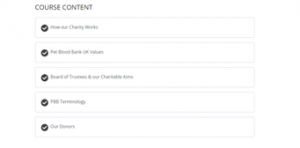
When you start the course you will be presented with the Course Content, which will show the lessons you will need to work through. Select the lesson you wish to take.
Your progress will be indicated by the progress bar at the top of the page.

You can navigate through the lessons and topics using the forward and backward buttons at the bottom of the page as shown or return to the course content.
Where it is present, you will need to click the Mark Complete button in some lessons to mark your progress.
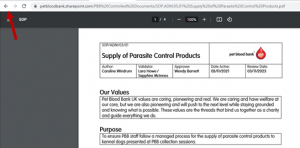
In order to read one of our controlled documents such as an SOP, when you click on the link in the lesson you will be redirected to our secure document server ‘Sharepoint’. Use the log in details provided in your training schedule to access SharePoint.
To return to the lesson after reading the SOP just click on the back arrow (top left) as shown below.
Some of our interactive tasks may need you to decrease your screen size so you can view everything.
If you have any problems with your training please contact cpd@petbloodbankuk.org so we can help you.
Let’s get started!
Leave a Reply
Want to join the discussion?Feel free to contribute!